A local-first project organizer: no account, no cloud, no moving files
ClingSpace keeps your project organization on your own PC. There is no account to create, nothing to migrate to a cloud and no copy of your files anywhere but where they already are.
5-day full trial • $19.99 one-time • Windows 10 (22H2) and 11, 64-bit
What local-first means here
Local-first means the app works with what is on your computer and does not need a server to do its job. In ClingSpace that has four concrete consequences:
- No account. Install it and start. You never sign in to use your Spaces.
- Your Spaces are stored locally. They live in a database on your PC, with automatic daily backups of that database and a restore option in Settings.
- It works offline. Day-to-day use needs no internet connection.
- Your files are not uploaded. ClingSpace does not upload files, and does not read their contents.
Files stay where they are
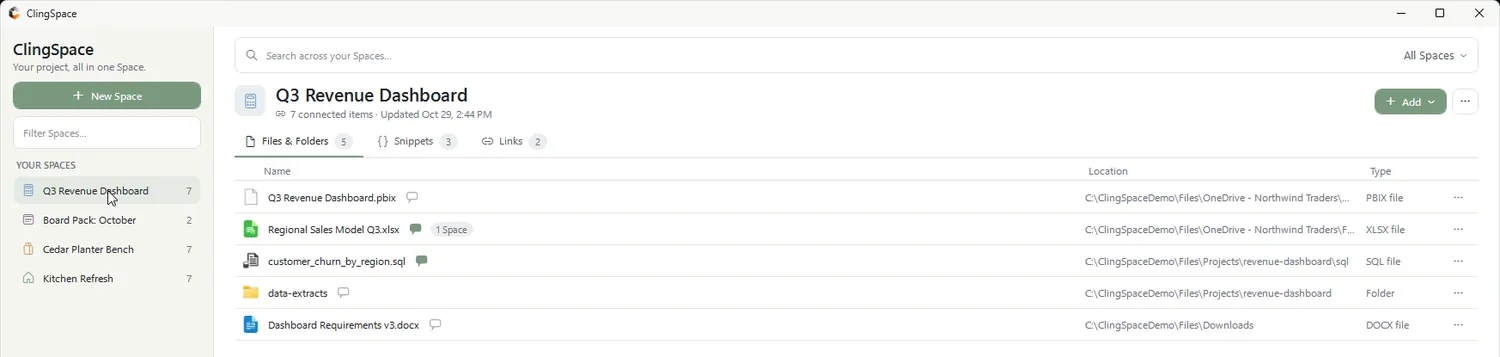
There is nothing to migrate. ClingSpace stores the location of each file and folder you add, not a copy. Your Documents, Downloads, OneDrive and project folders stay exactly as they are, and ClingSpace does not move, copy, modify or delete originals merely because you add or remove them from a Space.
What does go over the network
Being local-first is not the same as never connecting to anything, so here is the complete picture, in line with the privacy policy:
- License activation
- Entering a purchased license key contacts the licensing service (Lemon Squeezy) to validate it and register the PC. After activation ClingSpace keeps working offline.
- Updates (Direct build)
- The Direct download checks clingspace.com for a newer version, and the check can be turned off in Settings. The Microsoft Store version leaves updating to the Store.
- Limited anonymous analytics
- The app may count events such as first launch, launches, license activation and deactivation, with the app version, the distribution channel and a random installation identifier so one install is not counted repeatedly. This website counts page views and clicks on Download, Microsoft Store and Buy.
The analytics do not include file contents, file or folder names, paths, Space names, links, snippet or context text, Windows account names, email addresses, IP addresses or browser user-agent strings. On this website, Do Not Track and Global Privacy Control signals switch the analytics off.
Backups: what they cover and what they do not
ClingSpace keeps local backups of its own database, so your Spaces, links, snippets and notes can be restored. Those backups do not contain copies of the original files and folders your Spaces refer to. Keep backing up your important files with your normal backup system.
The trade-offs, stated plainly
Local-first has a cost, and you should know it before you install. Your Spaces live on the PC where you created them. A Direct license can be activated on up to 3 of your PCs, but ClingSpace does not sync Spaces between them. There is also no sharing, commenting or team workspace. In return you get a fast app that keeps working without internet and never asks you to put your project somewhere else.
If this matches how you work, the Windows project organizer page shows what a Space looks like in daily use.
Frequently asked questions
Do I need an account to use ClingSpace?
No. There is no ClingSpace account. A license key is only needed after the 5-day trial.
Are my files uploaded anywhere?
No. ClingSpace does not upload your files or read their contents, and it stores locations rather than copies.
Does ClingSpace work offline?
Yes. Activating a license needs the internet once; after that it works fully offline.
What analytics does ClingSpace collect?
Limited anonymous events such as launches and license activation, with app version, channel and a random installation identifier. File names, paths, Space names and note text are not collected. See the privacy policy for the full list.
Can I move my Spaces to another PC?
Spaces are stored locally on each PC and are not synced. A Direct license can be activated on up to 3 PCs, and you can release a PC in Settings to move the license.
Try it on a real project
Every feature is unlocked for 5 days. Keep ClingSpace afterwards with a one-time $19.99 license, or simply stop; your Spaces stay on your PC either way.
5-day full trial, every feature • $19.99 one-time • Direct license for up to 3 of your PCs