
A project workspace for Windows: one Space for each project
A project workspace should be the first place you look when you sit back down to a piece of work. In ClingSpace that place is a Space, and every project gets its own.
5-day full trial • $19.99 one-time • Windows 10 (22H2) and 11, 64-bit
What we mean by a project workspace
When people say “workspace” they often mean a window layout, a cloud notebook or a team tool. ClingSpace means something smaller and more personal: a single place on your Windows PC that holds everything you would otherwise have to hunt for to carry on with a project.
That includes the files and folders, but also the web pages you use, the text you paste again and again, and the notes that explain why something matters. The result is a short list you can open and start from, instead of a search through Documents, Downloads and your browser history.
One Space per project
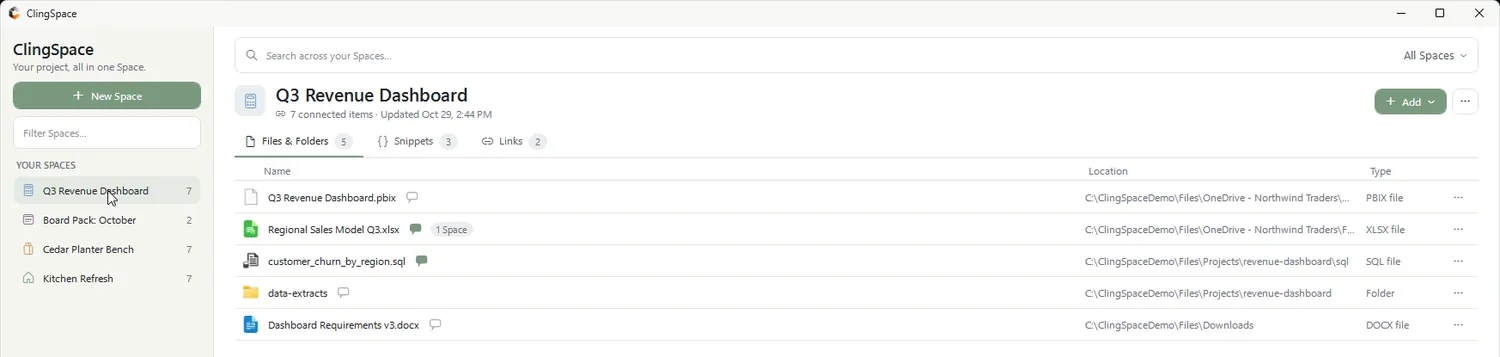
The unit is the Space. Create one when a project begins and let it grow. The demo data in ClingSpace shows the range:
Work
A Q3 Revenue Dashboard or a Board Pack: the report, the source workbook, the SQL, the brief, the reference links.
Home
A Kitchen Refresh: quotes, receipts, measurements, product pages and the contractor’s PDF.
Hobby
A Cedar Planter Bench: the plans, a cut list, build photos and the lumber order.
Spaces can be reordered, so this week’s projects stay at the top and finished ones sink to the bottom without being deleted.
What a Space can hold
- Files and folders
- Added by reference from anywhere on your PC. The originals are not moved or copied.
- Links
- Named web links kept with the project, such as documentation, a dashboard URL or a supplier page.
- Snippets
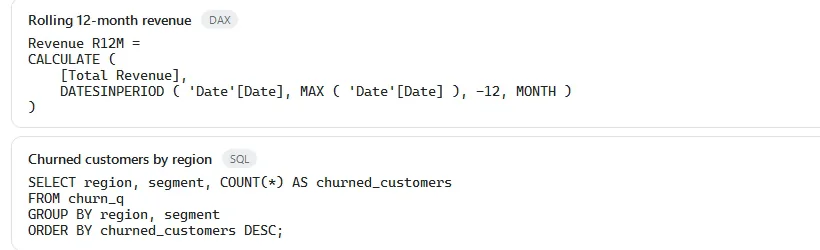
- Reusable text such as SQL, reminders or standard replies, copied with one click.
- Context
- A short note on any resource explaining why it matters. It follows the resource into every Space it belongs to.
Switching projects without losing your place
Because every Space is self-contained, moving from one project to another is a click on the list. Nothing from the previous project is left open or mixed in. The short loop below shows switching between four Spaces and then searching across all of them and within one.
Local-first, on purpose
Your Spaces live in a local database on your PC, with automatic daily backups of that database. ClingSpace works offline, needs no account and does not upload your files or read their contents. The local-first project organizer page explains exactly what is stored and what, if anything, leaves your computer.
Who it suits, and who it does not
ClingSpace suits people who juggle several projects on one Windows PC and keep losing time to scattered files: analysts, consultants, freelancers, makers, students and anyone running a home project alongside a job.
It is not a team tool. There is no shared workspace, commenting or sync between PCs, and it does not manage tasks or deadlines. If you need those, use a tool built for them; if you need your own project laid out on one screen, this is built for that.
Frequently asked questions
Is a Space the same as a folder?
No. A folder is a place on disk. A Space is a list of references to things that may live in many places, plus the links, snippets and notes that belong to the project. See the project folder alternative guide for the difference.
How many Spaces can I create?
As many as you need.
Can one file be in several Spaces?
Yes. The same item can belong to more than one Space without being duplicated.
Does ClingSpace work on more than one PC?
A Direct license can be activated on up to 3 PCs. Each PC keeps its own Spaces: ClingSpace does not sync Spaces between computers.
Is there a free trial?
Yes: a 5-day trial with every feature, then a one-time $19.99 license.
Try it on a real project
Every feature is unlocked for 5 days. Keep ClingSpace afterwards with a one-time $19.99 license, or simply stop; your Spaces stay on your PC either way.
5-day full trial, every feature • $19.99 one-time • Direct license for up to 3 of your PCs