
A project folder alternative for projects that don’t fit one folder
Folders and projects are different shapes. A file lives in exactly one folder, while a project often draws on files from several. ClingSpace is built for that second shape, alongside the folders you already use.
5-day full trial • $19.99 one-time • Windows 10 (22H2) and 11, 64-bit
A folder answers a different question
A folder is a good answer to “where is this file stored?” Every file has exactly one answer, and that is a strength: it keeps storage predictable and lets other programs, backups and colleagues find things.
A project asks “what is involved in this piece of work?” and the answer is a set, not a place. It can include a contract in Documents, a quote in Downloads, a spreadsheet in OneDrive, a folder of photos and a handful of web pages. Those things have no reason to share a parent folder, and forcing them to is where the friction comes from.
This is a difference of use case, not a flaw in Windows Explorer. Explorer is excellent at storing and managing files. It is simply not meant to describe a project that cuts across storage.
Where the one-folder model strains
- A file serves two projects
- A receipts folder supports both a kitchen refresh and the household budget. In a folder tree it must live under one of them.
- The source is not yours to move
- The deck lives in a shared OneDrive folder, and the document came from an email. Moving either can break links and habits.
- Not everything is a file
- The supplier page, the SQL you keep rewriting and the reminder about the Targets tab do not live in any folder.
- The project changes shape
- Last month’s clean folder structure no longer matches this month’s project.
What a Space does differently
A Space is a list that refers to things where they are. Because it only stores references, one file can be in several Spaces. And because a Space can also hold links, snippets and notes, the project is complete in one place.
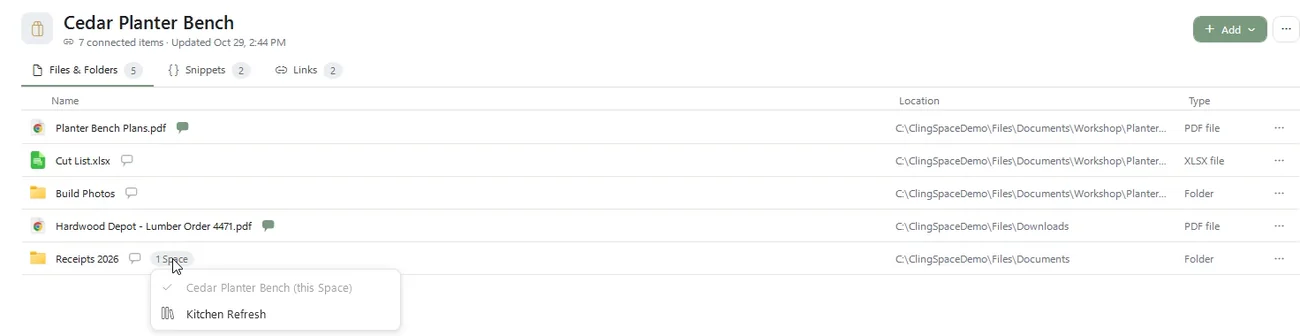
Nothing about your folder structure changes, so you keep every advantage of it.
Use both: folders for storage, Spaces for projects
The healthiest setup is to keep your folders as they are and treat Spaces as the project layer on top. Folders keep doing storage, backup and sharing. Spaces answer “what do I need to carry on with this?” Items open in their usual programs from their real locations, so nothing about how you work with the files has to change.
When a plain folder is the better choice
A single folder is the right answer when a project’s files genuinely live together, when a whole team works in one shared folder, or when you want your backup and sync tools to treat the project as one unit. In those cases, a folder is simpler and you do not need ClingSpace. It earns its place when a project spreads across locations and keeps costing you search time. For the mechanics, read how organizing without moving works.
Frequently asked questions
Is ClingSpace a replacement for File Explorer?
No. It works alongside it. Files stay in their folders and keep opening in their usual programs.
Can a file be in more than one Space?
Yes. One file can belong to several Spaces without being duplicated.
Do I have to reorganize my folders first?
No. Add items from wherever they are. Your folder structure is not touched.
Does a Space back up or sync my folder?
No. A Space holds references plus your links, snippets and notes. Keep using your existing backup and sync tools for the files.
When should I stick with a normal folder?
When all of a project's files naturally live in one place, or when a team shares one folder. A Space helps when a project spans locations.
Try it on a real project
Every feature is unlocked for 5 days. Keep ClingSpace afterwards with a one-time $19.99 license, or simply stop; your Spaces stay on your PC either way.
5-day full trial, every feature • $19.99 one-time • Direct license for up to 3 of your PCs