ClingSpace

Your project is everywhere. Bring it into one Space.

ClingSpace Your project, all in one Space.

ClingSpace is a local-first project workspace for Windows and Mac. Create a Space for any project and bring together files, folders and resources from anywhere on your computer, without moving the originals.

$19.99 one-time • 5-day full trial

Version 1.0.3 • 64-bit Windows • Mac 1.1.2 (macOS 12.0 or later)

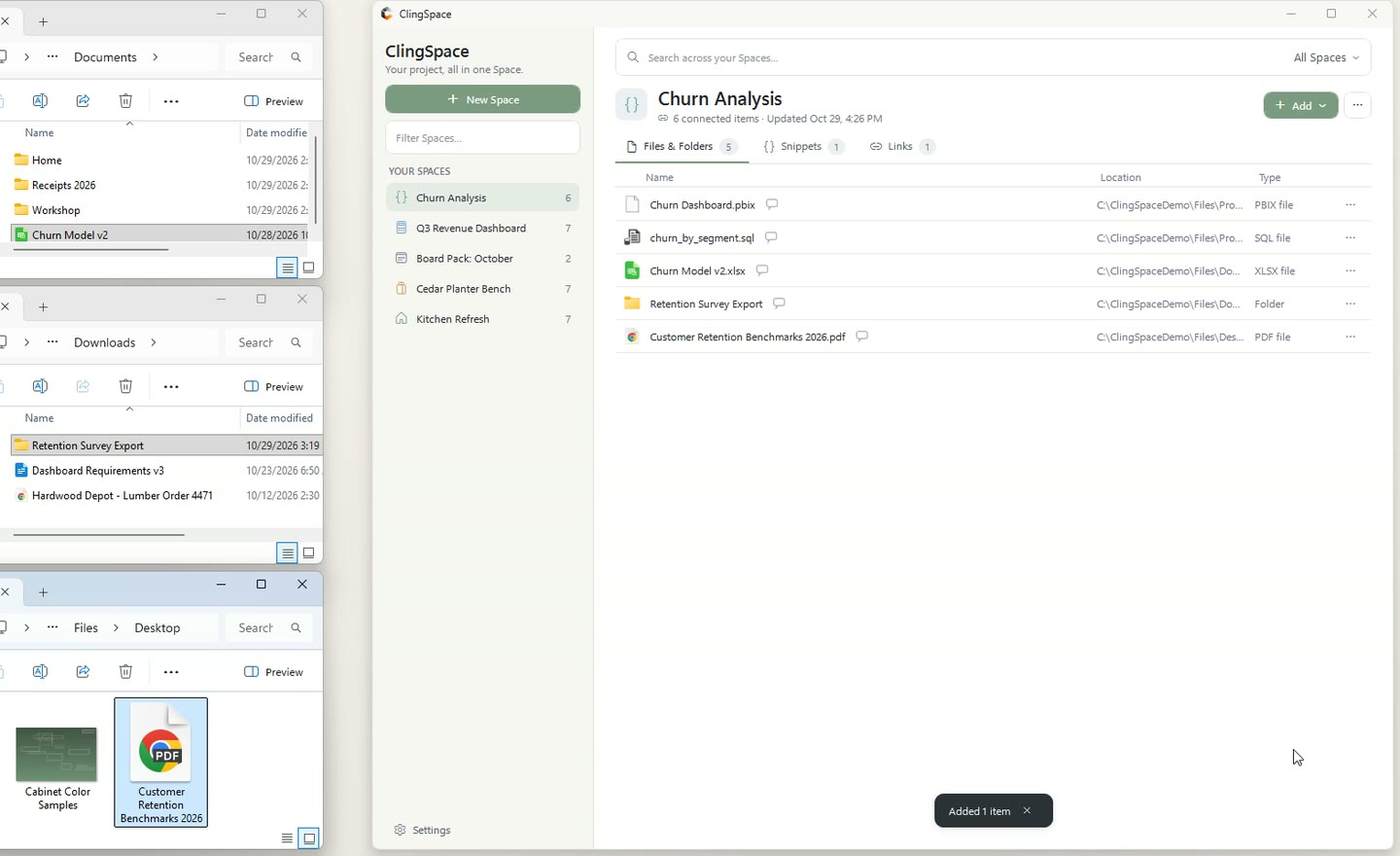
The real app: a workbook, a folder and a PDF dragged in from three different folders. The originals never move.

A Space is where your project comes together.

Your files can live in Documents, Downloads, OneDrive, another project folder or anywhere else. ClingSpace keeps the project relationship without moving or duplicating the originals.

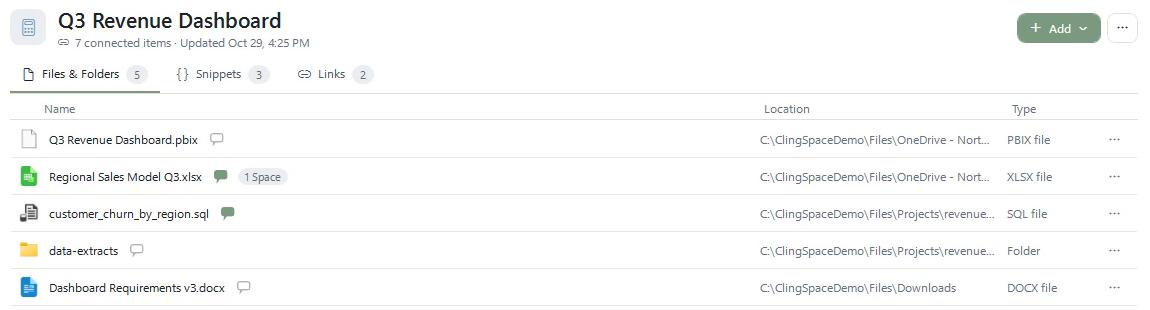
  1. OneDrive the dashboard and its workbook
  2. Projects the SQL and the data extracts
  3. Downloads the requirements doc
The Q3 Revenue Dashboard Space: a Power BI report, a workbook, a SQL file, a folder and a Word document, each listed with its real location in OneDrive, Projects or Downloads.

Store the map, not the files.

After three drags, the Space lists a workbook, a folder and a PDF, while Documents, Downloads and Desktop still show the same files in place.
After the drag: the Space lists all three, and each original is still in Documents, Downloads or Desktop.

Spaces

One app. Every project.

  • Q3 Revenue Dashboard
  • Board Pack: October
  • Kitchen Refresh
  • Cedar Planter Bench
  • Create as many project Spaces as you need.
  • Switch between them instantly.
  • Each one keeps its own resources, in its own order.
  • Search all of them at once, or only the one you are in.

Lay out the project the way your brain expects it.

Drag to reorder
Put the brief first and the archive last.
Reorder your Spaces
Keep this week’s projects at the top.
Add and remove freely
Removing something from a Space never touches the original.
Names that make sense
Name your Spaces, links and snippets the way you think about them.

Projects are more than files.

Context

Keep the “why” attached to the resource. The note follows it into every Space.

Hovering the note on a workbook: Source of truth for regional targets. Finance updates it every Monday. Do not edit the Targets tab.

Snippets

Reusable SQL, notes, reminders and references, one click to copy.
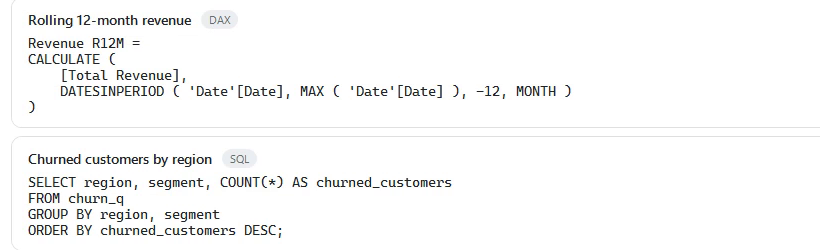
Two code snippets: a DAX rolling 12-month revenue measure and a SQL query for churned customers by region.

Shared resources

The same resource can belong to more than one Space, without duplicating it.
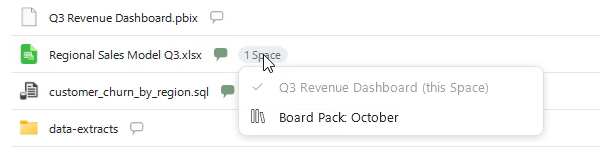
The workbook's chip lists the Spaces it belongs to: Q3 Revenue Dashboard (this Space) and Board Pack: October.

New in ClingSpace for Mac

Tasks. Now with Checklists and Kanban.

Keep the to-do list inside the Space it belongs to. Work through it as a checklist, or switch to a Kanban board.
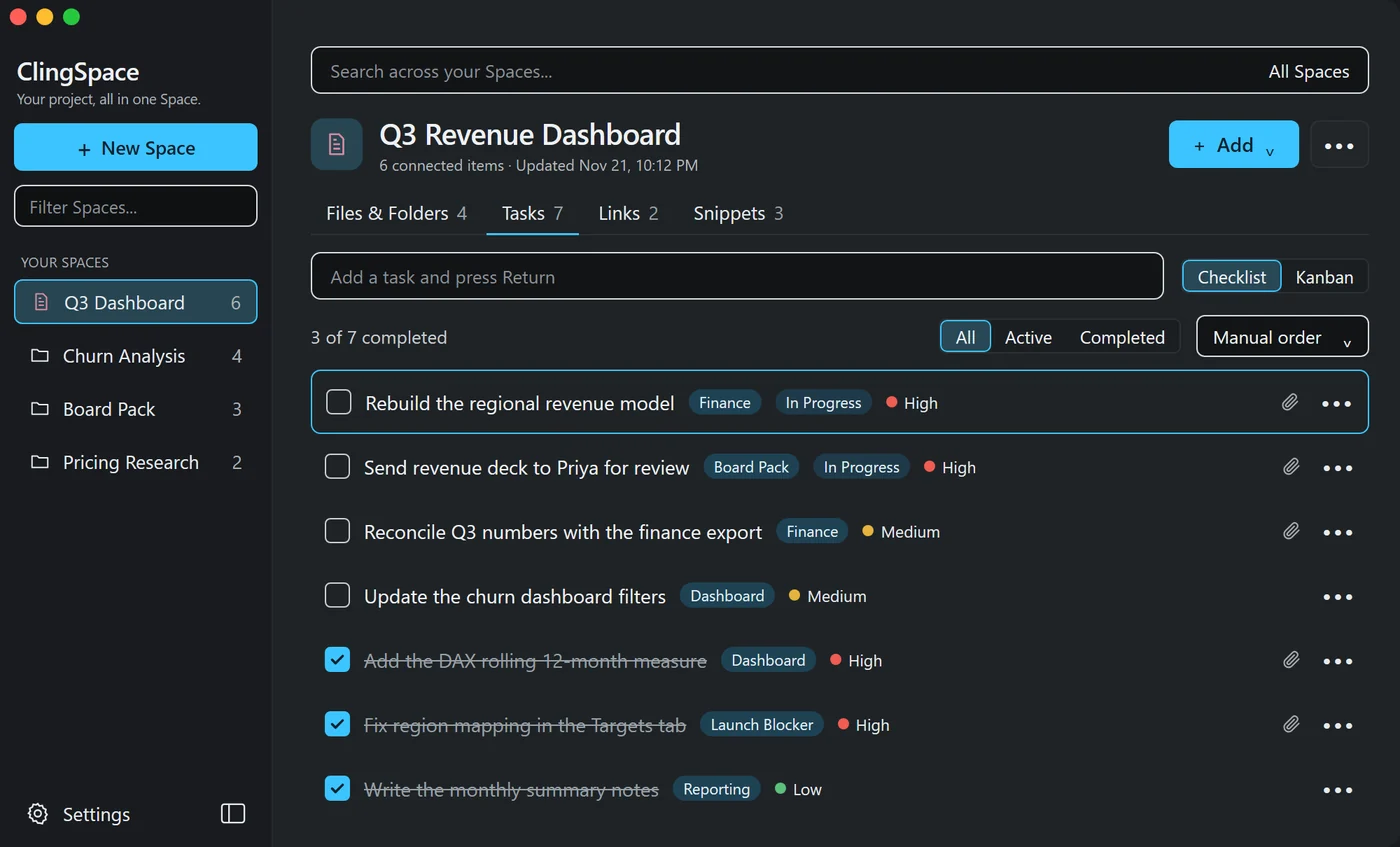
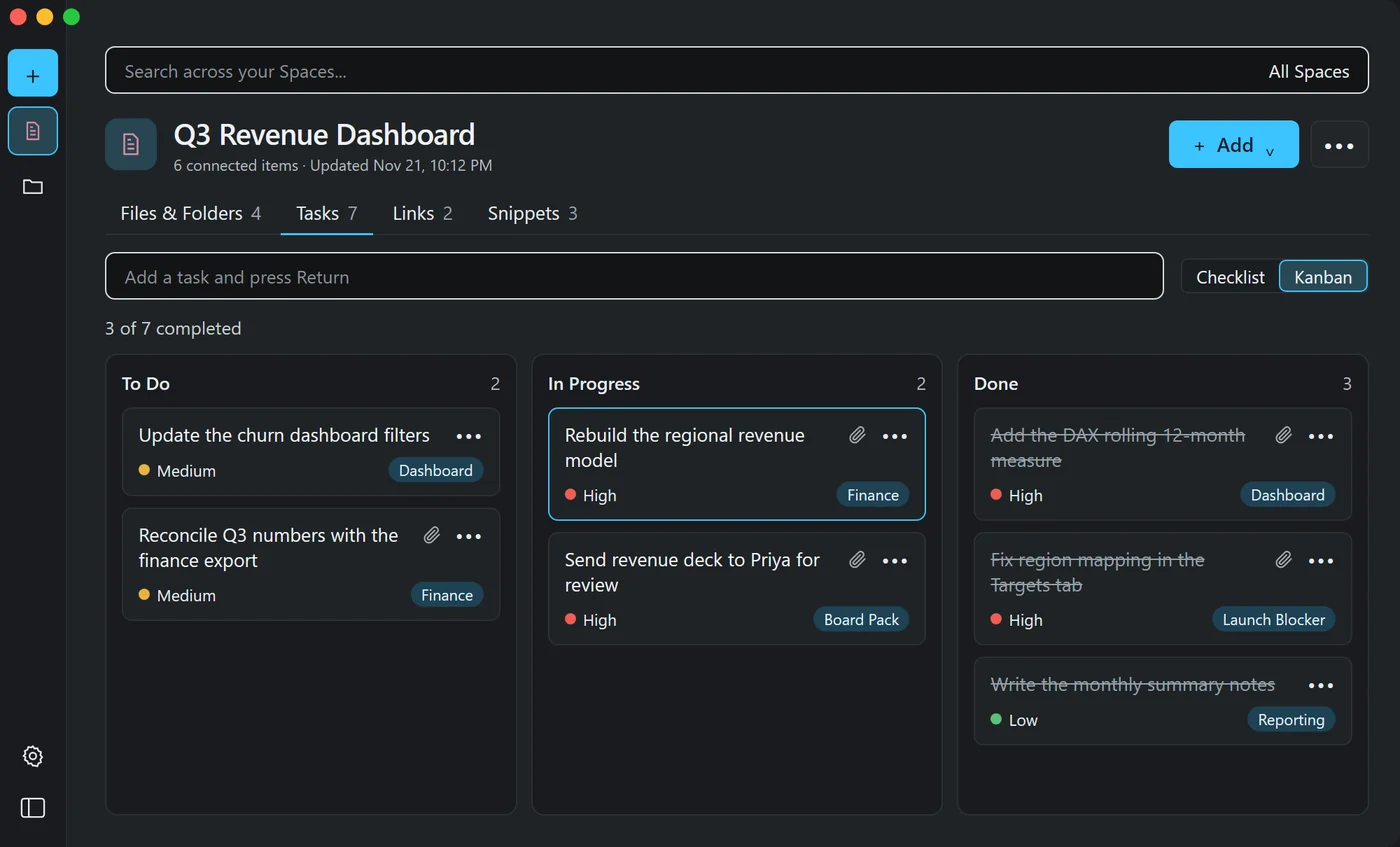
  • Priority. Mark what matters most: High, Medium or Low.
  • Labels. Group tasks by category, like Design or Launch Blocker.
  • Progress. See what is to do, in progress and done, and how much of the list is finished.
  • Start from a file. Make a task directly from a file in a Space, and it stays linked to it.
The Tasks tab of a Space in checklist view: seven tasks with labels, priorities and a count of three of seven completed.
Checklist
The same tasks on a Kanban board with To Do, In Progress and Done columns.
Kanban
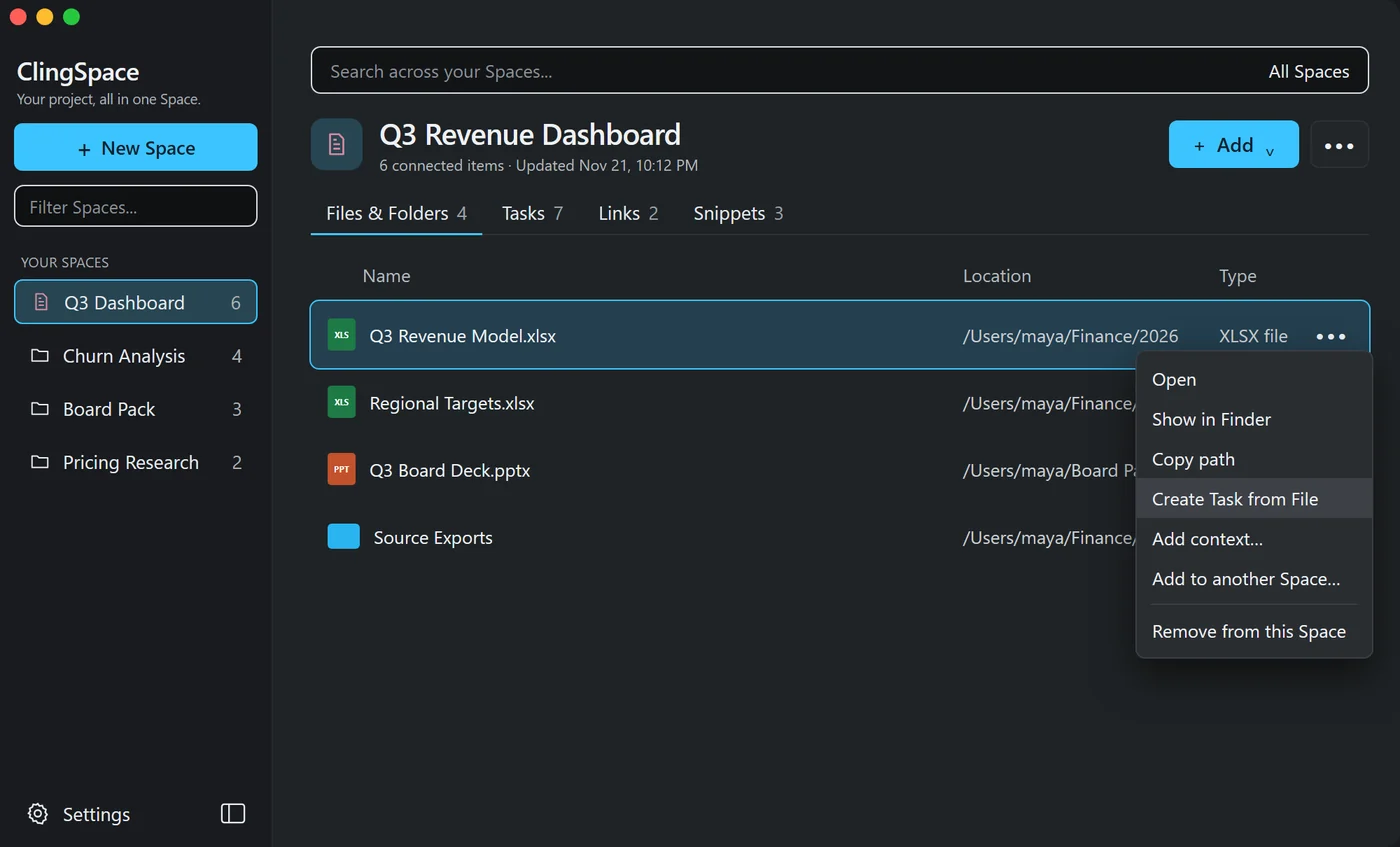
Right-clicking a file in a Space shows a menu with Create Task from File.
Create a task from any file in a Space
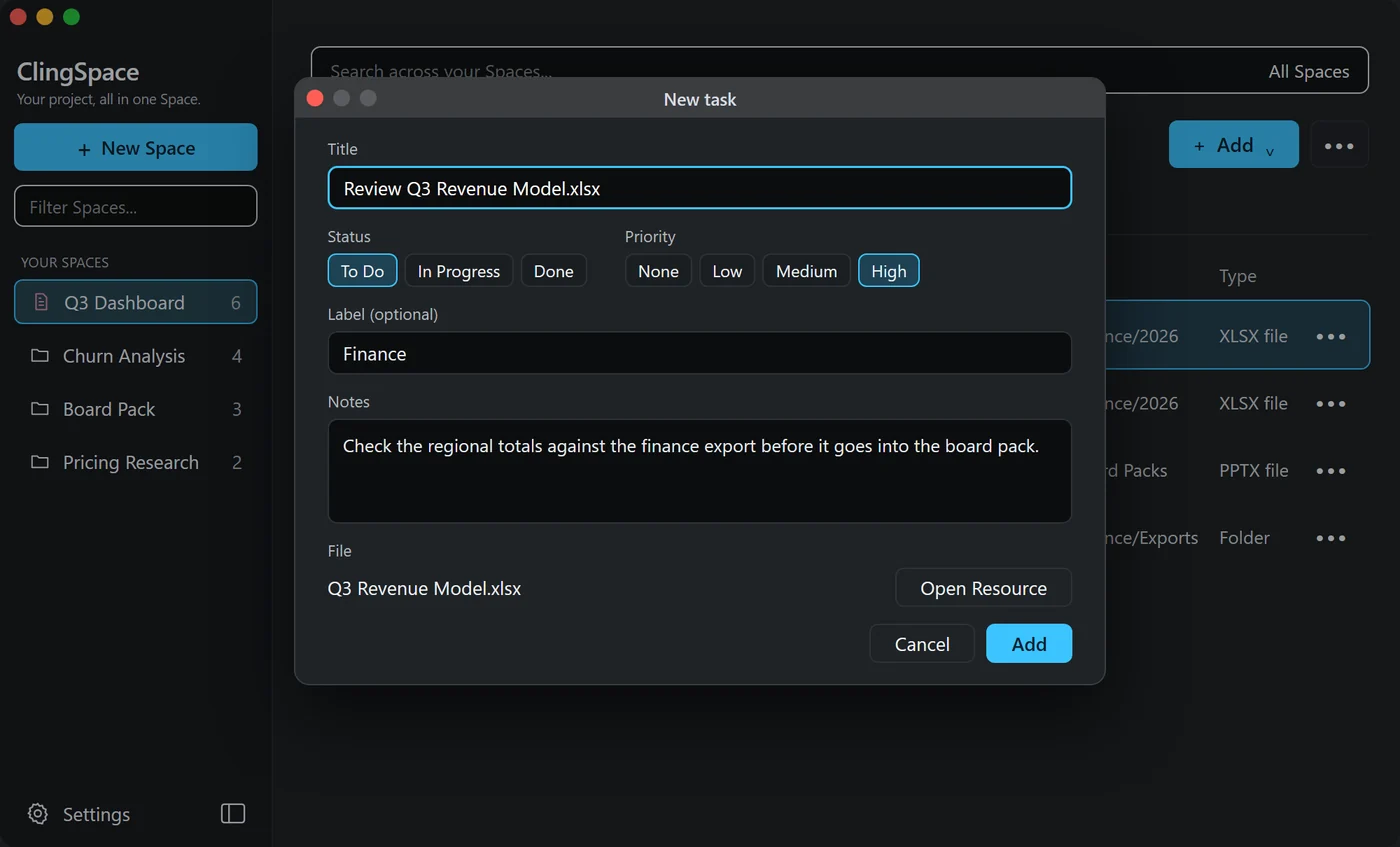
The New task window: title, status, priority, label, notes and the linked file.
Title, status, priority, label and notes

Make the workspace yours.

LightDarkMatch Windows

Nine accent colours, or pick your own.

Your project stays on your PC.

  • Files are not uploaded.Nothing goes to a cloud copy.
  • Files are not moved.The originals stay exactly where they are.
  • Contents are never read.ClingSpace stores where a file is, not what it says.
  • A local database.Your Spaces live on your computer, with daily backups.
  • Works offline.Only activation needs the internet.
  • No account required.Install it and start.

The app and this site count anonymous events such as launches and downloads, with no file names, paths, notes, links or personal details. Do Not Track and Global Privacy Control are respected here. Read the full privacy policy.

$19.99. Once.

Try everything for 5 days. Keep it with a one-time license.

  • 5-day full trial, every feature
  • Up to 3 computers, Windows or Mac
  • No subscription
  • Your Spaces stay safe if the trial ends

Already tried it? Buy a license

Ways people organize projects with ClingSpace

Questions

Does ClingSpace move or copy my files?

No. A Space stores where each file or folder is. Your originals stay exactly where they are, and removing something from a Space never changes the original.

What happens if a file moves or is renamed?

ClingSpace tells you clearly when something cannot be found where it was, and helps you find it again so you can point the Space at its new location.

Does ClingSpace work offline?

Yes. It only needs the internet to activate or release a license. After that it works fully offline.

What happens when the 5-day trial ends?

Your data is untouched. The workspace is covered by a simple page until you enter a license, and Settings stays available for backups, restore and your license.

How many computers can I use?

One license works on up to 3 computers in total, across Windows and Mac. You can release a computer from Settings to move the license to another one.

Is there a subscription?

No. ClingSpace is a one-time $19.99 license.

Still have a question? Email support@clingspace.com or visit Support.

Your project, all in one Space.

Windows and Mac • $19.99 one-time • 5-day trial

www.ClingSpace.com